Function of the Stage of a Microscope: Parts, Types and How to Use It
What Is the Stage of a Microscope?
The stage is the flat platform on a microscope where you place the slide. It sits below the objective lenses and above the condenser and light source.
In short, it holds the slide steady, positions the specimen over the light opening, and, on a mechanical stage, moves the slide smoothly in two directions. Without it, even excellent lenses would be hard to use, because the specimen would drift out of view the moment you touched anything.
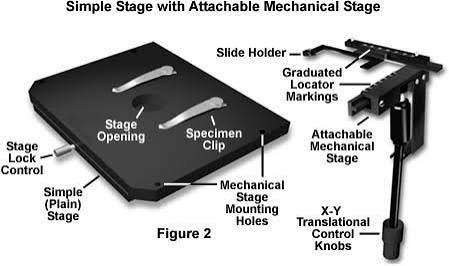
You may also see it called the specimen stage, slide platform, or microscope platform. On a labeled diagram, it is the horizontal shelf in the middle of the instrument, usually with a round hole at its center.
Why the Stage Matters
At low power, a slide is easy to find and easy to move by hand. At 400x, a shift of a fraction of a millimeter can send your target out of the field entirely.
A good stage solves three problems at once: stability, alignment, and controlled movement. That is why students, lab technicians, pathologists, and quality-control inspectors all depend on it, even though it has no lenses and does no magnifying itself.
The Main Function of the Stage of a Microscope
1. It supports and steadies the slide
The platform gives the slide a flat, rigid surface. Stage clips or a slide holder keep the glass from sliding while you focus or change objectives.
2. It aligns the specimen with the light path
The central hole, called the stage aperture, lets light travel up from the illuminator through the slide and into the objective lens. Centering the specimen over this opening is what makes transmitted light microscopy work.
3. It positions and moves the specimen
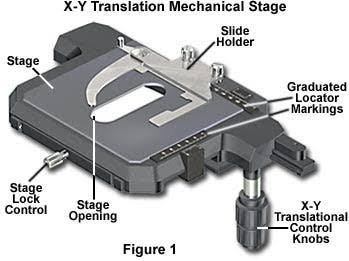
On a mechanical stage, two knobs move the slide left and right (the X axis) and forward and back (the Y axis). This lets you scan a slide in a methodical pattern instead of nudging it around by hand.
4. It makes repeat viewing possible
Many mechanical stages carry a vernier scale, a set of fine markings you can read to record a position. Note the numbers for an interesting cell, and you or a colleague can find it again later.
What the stage does not do
The stage is not an optical part. It does not magnify, focus light, or improve contrast by itself. Those jobs belong to the objective lenses, the eyepiece, the condenser, and the iris diaphragm.
It can influence image quality indirectly. A loose or wobbly stage causes vibration, and a slide that is not flat gives you a blurry field no matter how well you focus.
Parts of a Microscope Stage
If you need to label a diagram, these are the parts to know.
| Part | Function |
| Stage platform | Flat surface that supports the slide |
| Stage aperture | Central opening that lets light pass through the specimen |
| Stage clips | Spring arms that hold the slide on a basic stage |
| Mechanical slide holder | Sliding frame that grips the slide and carries it |
| X and Y control knobs | Move the slide horizontally and forward-back |
| Vernier scale | Fine markings used to read and record a position |
| Stage stops | Limit travel so the slide cannot leave its range |
On many student microscopes, the X and Y knobs sit on one shared shaft, called coaxial controls. Turning the upper knob moves the slide one way, and the lower knob moves it the other way.
Does the Stage Move Up and Down?
It depends on the design, and this is one of the most common points of confusion.
On many classroom microscopes, the coarse and fine focus knobs raise and lower the stage. On many other models, the stage stays at a fixed height, and the nosepiece or the whole optical head moves instead.
Either way, the aim is the same: change the distance between the slide and the objective. Check your own model before assuming, and always give the objective clearance before you load or remove a slide.
Types of Microscope Stages
Fixed (plain) stage
A flat platform with two stage clips. You move the slide by hand. It is common on entry-level and children’s microscopes, and fine for low magnification.
Mechanical stage
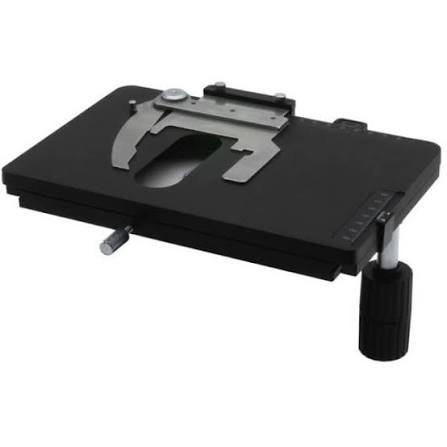
A slide holder with X and Y knobs gives smooth, precise movement. This is the standard on most laboratory and school compound microscopes, and the best choice once you use 40x objectives or higher.
Rotating stage
This stage turns through 360 degrees. It is used mainly in polarized light microscopy and geology, where the orientation of a crystal or mineral changes what you see.
Motorized stage
Motors, driven by software or a joystick, move the stage automatically. Research labs and pathology services use it for tiling, time-lapse work, and automated slide scanning.
Inverted microscope stage
On an inverted microscope, the objectives sit below the specimen, and the stage holds culture dishes or plates. Cell biology labs use this setup for living cells.
Heated or environmental stage
This is an insert that controls temperature, and sometimes humidity and gas, for live-cell imaging.
| Stage type | How it moves | Typical user | Precision |
| Fixed | By hand | Children, basic classroom use | Low |
| Mechanical | X/Y knobs | Students, general labs | Medium to high |
| Rotating | X/Y plus rotation | Geology, polarized light | High |
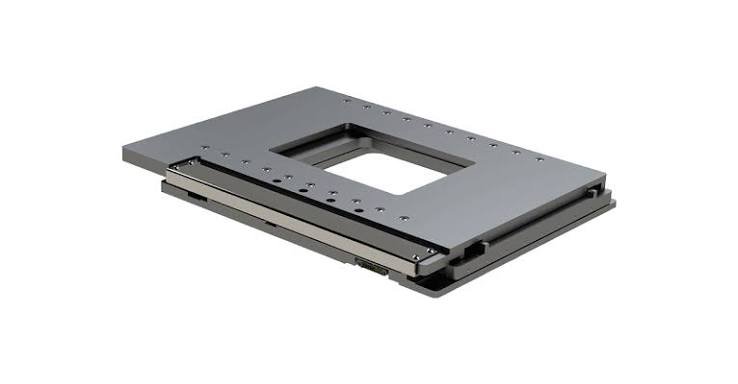
| Motorized | Software controlled | Research, pathology | Very high |
| Inverted | Dish or plate holder | Cell culture labs | Varies |
Stage, Mechanical Stage, and Stage Micrometer: Clearing Up the Confusion
These three terms are often mixed up.
- Stage: the platform itself.
- Mechanical stage: a stage that includes a slide holder and X/Y knobs for controlled movement.
- Stage micrometer: a special calibrated slide, not part of the stage. It carries a tiny precise ruler and is used to calibrate an eyepiece scale so you can measure the size of specimens.
The stage is also not the base. The base is the heavy foot that supports the whole microscope and often houses the light source. The stage sits much higher, between the lenses and the light.
How to Use the Stage Step by Step
Follow this routine on a standard compound microscope.
- Create clearance. Lower the stage, or raise the objective, with the coarse focus knob.
- Select low power. Rotate the nosepiece to the lowest-power objective, usually 4x.
- Open the holder. Pull back the spring lever of the slide holder, or lift the stage clip.
- Load the slide. Place it with the coverslip facing up and the specimen over the aperture.
- Release gently. Let the holder grip the slide. Never force it.
- Center the specimen. Turn the X and Y knobs until the sample sits in the light path.
- Focus. Use the coarse knob at low power, then refine with the fine knob.
- Increase magnification. Switch to a higher objective only after the specimen is centered and sharp. At 40x and above, use the fine knob only.
- Scan methodically. Move across the slide in a regular pattern, like mowing a lawn, so you do not skip areas.
- Finish safely. Return to low power, lower the stage, and remove the slide.
How to read the vernier scale
Look at the fixed scale and the sliding scale together. The main reading is the millimeter mark just before the zero of the sliding scale. The extra tenths come from the line on the sliding scale that lines up exactly with a line on the fixed scale.
Record both axes, for example as a pair of numbers, so you can return to the same field later.
Which Stage Do You Need? A Simple Decision Guide
Choose a fixed stage if:
- The user is a young child or a first-time observer.
- You will stay at low magnification.
- Budget is the main concern.
Choose a mechanical stage if:
- You plan to use 40x objectives or higher.
- You need to scan slides systematically.
- You want to record and relocate positions.
Choose a rotating stage if:
- You work with polarized light, minerals, or oriented crystals.
Choose a motorized stage if:
- You scan many slides, need automation, or build image mosaics.
Consider an inverted setup if:
- You examine living cells in dishes or flasks.
A useful rule of thumb: if there is any chance you will use a 40x or 100x objective, pick a mechanical stage from the start. Hand-positioning a slide at that power is slow and frustrating.
Pros and Cons at a Glance
| Stage type | Advantages | Drawbacks |
| Fixed with clips | Simple, inexpensive, easy for kids | Hard to center at high power, no repeatable positions |
| Mechanical | Smooth, precise, supports systematic scanning | Costs more, knobs can wear if mishandled |
| Rotating | Ideal for oriented specimens | Specialized and more expensive |
| Motorized | Automation, tiling, speed | Highest cost, needs software and power |
Prices vary widely between student microscopes and professional systems, and also by country and supplier. Compare local education suppliers, lab equipment distributors, and authorized dealers for current figures and warranty terms.
Some mechanical stages can be added to a fixed-stage microscope, but they are often model-specific. Confirm compatibility with the manufacturer before buying.
Common Problems and How to Fix Them
The slide drifts or will not stay still
Check that the slide is seated flat against the holder’s fixed edge. Make sure the clip or holder spring is not worn or bent.
The image jumps when you reverse direction
This is backlash, a small amount of play in the mechanism. Turn the knob a little past the position you want, then come back to it from the same direction each time.
The knobs feel stiff or gritty
Dust, dried oil, or old residue can build up in the mechanism. Clean the exterior and follow the manufacturer’s guidance. Do not improvise with household lubricants.
You lose the specimen after switching objectives
Return to low power, re-center, and refocus. Most good microscopes are parfocal, meaning focus stays close when you change objectives, but small shifts are normal.
Mistakes to Avoid
- Changing slides without first lowering the stage or raising the objective, which risks crashing the lens into the glass.
- Forcing a slide into the holder, which can crack it.
- Loading the slide upside down, with the coverslip facing down.
- Using the coarse focus knob at high power.
- Turning the X/Y knobs past their stops.
- Leaving immersion oil on the stage, where it attracts dust and can creep into the mechanism.
Care and Cleaning Checklist
- Unplug the microscope before cleaning anything near the illuminator.
- Wipe the stage with a lint-free cloth.
- Remove oil or residue with a cleaner approved for your microscope, and keep liquids away from the knobs and moving parts.
- Keep the slide holder spring moving freely.
- Lower the stage before storing the instrument.
- Use a dust cover when it is not in use.
If the stage still sticks, drifts, or feels loose after basic cleaning, a microscope service center or the manufacturer’s support team is the safest next step.
Where the Stage Fits Among Other Microscope Parts
Light starts at the illuminator in the base. It passes through the condenser and iris diaphragm, then through the stage aperture and the specimen, then into the objective lens and up through the body tube to the eyepiece.
The arm connects the head to the base and is what you hold when carrying the microscope. The nosepiece, the revolving holder for the objectives, sits above the stage.
Knowing this order makes labeling diagrams easier. It also helps you troubleshoot, because many “stage problems” are actually lighting or focus problems.
Quick Tips for Exams and Labeling
- Write “stage” for the flat platform and “stage clips” for the arms that hold the slide.
- If the diagram shows knobs on the stage, label it a mechanical stage.
- The hole in the middle is the aperture.
- Do not confuse the stage with the base, which is the bottom support.
- A one-line answer works well: the stage holds the slide and positions it under the objective lens.
Practical User Experience
This section describes how stages typically behave in everyday use. It is not a test of one specific model.
On a fixed stage with clips, loading a slide takes a couple of seconds. At 4x and 10x it works well: you nudge the slide by hand and the specimen stays easy to find. At 40x, that changes. Even a light touch can send the field sliding away, and finding the same cell again takes patience.
A mechanical stage feels different. The first few minutes take some adjustment, since each knob moves only one axis. After a short practice, scanning in steady rows becomes routine, and returning to a spot is much easier when you note the vernier readings.
Small annoyances are common. Spring-loaded holders can feel stiff with thin or slightly warped slides. Knobs may show a little backlash, so you approach a position from one direction. Oil and fingerprints collect quickly on shared classroom instruments.
Habits matter more than hardware. Starting at low power, lowering the stage before loading, and wiping the surface after each session prevents most of the problems users report.
Overall impression: the stage is easy to ignore when it works and obvious when it does not. A mechanical stage is worth having for anything beyond 10x. A fixed stage is adequate for casual, low-power viewing, though it becomes tiresome at higher magnification.
Frequently Asked Questions
1.What is the function of the stage in a microscope?
It holds the slide steady under the objective lens, positions the specimen over the light opening, and on a mechanical stage lets you move the slide precisely in two directions.
2.What is the hole in the stage called?
It is called the stage aperture. It allows light from the illuminator to pass through the specimen and into the objective.
3.What is the difference between a stage and a mechanical stage?
A basic stage is a flat platform with clips, and you move the slide by hand. A mechanical stage adds a slide holder and X/Y knobs for smooth, controlled movement.
4.Does the stage of a microscope move up and down?
On some microscopes it does, and the focus knobs raise and lower it. On others the stage stays fixed and the nosepiece or head moves. Check your model.
5.What are stage clips used for?
Stage clips press the slide against the stage so it does not slip while you focus, scan, or change objectives.
6.Is the stage the same as the base of a microscope?
No. The base is the heavy foot at the bottom that supports the instrument. The stage is the platform higher up, where the slide sits.
7.What is a stage micrometer?
It is a calibrated slide with a very fine ruler, used to calibrate measurements in the eyepiece. It is a tool you place on the stage, not part of the stage itself.
8.Why do some stages rotate?
Rotating stages are used in polarized light microscopy and geology, where turning the specimen changes how crystals appear.
9.How do you clean a microscope stage?
Unplug the microscope, wipe the surface with a lint-free cloth, and use a manufacturer-approved cleaner for oil or residue. Avoid soaking the mechanism.
10.Can I add a mechanical stage to a basic microscope?
Sometimes. Add-on stages exist for certain models, but fit varies, so confirm compatibility with the manufacturer or supplier first.
Conclusion
The stage is a simple platform that does a demanding job. It supports the slide, lines the specimen up with the light, and, when mechanical, gives you the control to scan and revisit details with confidence.
If you are a student, learn the parts and the loading routine. If you are buying, choose a mechanical stage when higher magnification is likely. If you work in a lab, look at rotating or motorized options for specialized or high-volume work.
Whichever you use, load slides with care, start at low power, and keep the stage clean and dry. Those small habits protect your slides, your lenses, and your results.
These information are gathered from different surveys, medical tests and tech giants like Techradar and more. Our top priority is to provide you valuable information about Function of the Stage of a Microscope.
For More Details About Different Digital Microscopes Click Here