Stage on a Microscope: Function, Parts, Types and How to Use It
What Is the Stage on a Microscope?
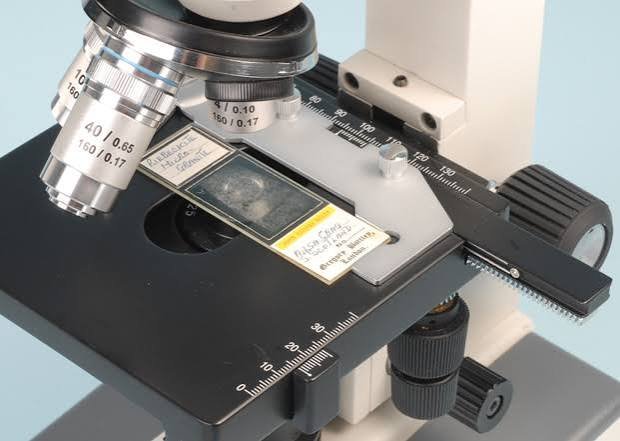
The stage is the flat platform on a microscope where you place the specimen slide. It sits between the objective lenses above and the condenser and light source below.
It holds the slide steady, positions it over the light path, and on many models moves it smoothly in two directions. You may also see it called the specimen stage or slide platform.
A round opening in the middle, the stage aperture, lets light pass up through the specimen. Without that opening, a standard transmitted-light microscope could not form an image.
Why the Stage Matters More Than It Looks
At high magnification, tiny movements look enormous. A slide that shifts by a fraction of a millimeter can drop your specimen right out of the field of view.
A good stage gives you three things:
- Stability: a steady slide means a steady, sharp image.
- Precision: small, controlled moves let you scan a sample properly.
- Repeatability: on stages with a scale, you can return to the same spot later.
Students lean on it to find specimens quickly. Lab technicians rely on it to examine samples systematically. Buyers often judge a microscope by how smooth the stage feels.
Functions of the Microscope Stage
1. Supports the Slide
The stage carries the slide and keeps it flat. A flat slide stays in focus across the whole field instead of blurring at the edges.
2. Holds the Slide in Place
Stage clips on basic models, or a spring-loaded slide holder on mechanical stages, press the slide into position. This stops it from sliding while you focus or move the microscope.
3. Positions the Specimen Over the Light Path
The aperture lines the specimen up with the condenser and objective. Light travels from the illuminator, through the specimen, and into the lens.
4. Moves the Specimen Precisely
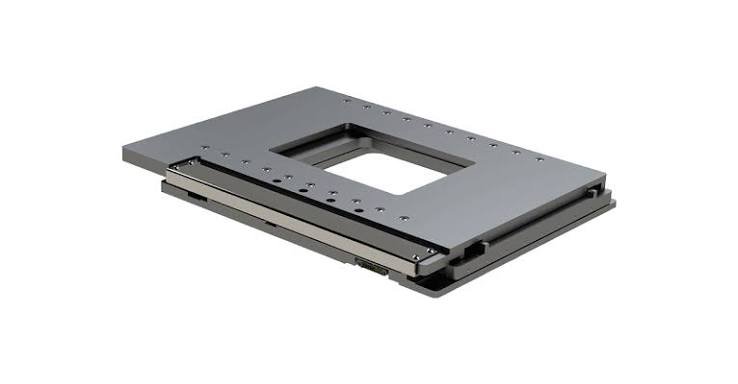
On a mechanical stage, two knobs below the stage move the slide left and right (X-axis) and forward and back (Y-axis). This replaces nudging the slide by hand, which causes bumps and vibration.
5. Enables Systematic Scanning
Moving in slow, even rows lets you cover an entire sample without missing areas or viewing the same cells twice.
6. Supports Position Recording
Many mechanical stages carry a vernier scale. It lets you note a feature’s coordinates and find it again later, which is useful for teaching, pathology review and quality checks.
Parts of the Microscope Stage
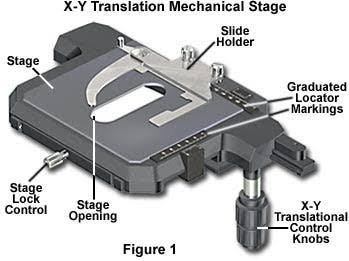
| Part | What it does | Where you find it |
| Stage plate | Supports the slide | Top flat surface |
| Aperture | Lets light pass through the specimen | Center of the stage |
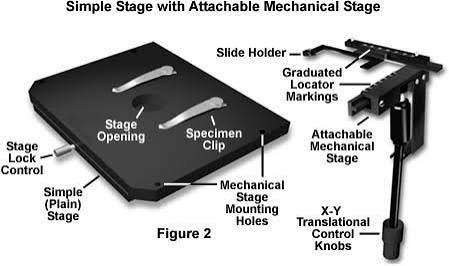
| Stage clips | Hold the slide on simple stages | Two metal arms on top |
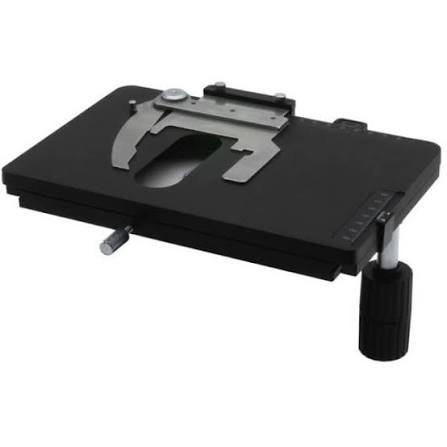
| Mechanical stage (slide holder) | Grips the slide and moves it | Mounted on the stage plate |
| X-Y control knobs | Move the slide in two directions | Below the stage, often on one shaft |
| Vernier scale | Records slide position | Edge of the mechanical stage |
| Travel stops | Limit how far the slide can move | Inside the mechanism |
How the Stage Works With Other Parts
The stage never works alone. Below it, the condenser focuses light and the iris diaphragm controls how much light reaches the slide. Above it, the nosepiece swings the objective lenses into place.
The coarse and fine focus knobs change the distance between the objective and the slide. On some microscopes the stage itself moves up and down to focus. On others, the nosepiece or body moves while the stage stays still.
The arm and base keep all of this aligned and steady.
Types of Microscope Stages
| Type | Best for | Main limitation |
| Fixed stage with clips | Young children, quick demos, low power | Hard to move smoothly at high power |
| Mechanical stage | School, lab, anyone using high magnification | Costs more, more parts to maintain |
| Attachable mechanical stage | Upgrading a basic microscope | Must match the model’s stage size and mounting |
| Rotating stage | Polarizing microscopes, geology, crystals | Specialist use |
| Heated or environmental stage | Live-cell observation | Research-grade equipment |
| Stereo microscope stage plate | Coins, circuit boards, insects | Different design from compound stages |
Moving Stage vs. Fixed Stage Designs
Some microscopes focus by raising and lowering the stage. This is common on older and many school models.
Others keep the stage at a fixed height and move the nosepiece or body instead. This design is often easier when you add heavy accessories, because the specimen does not move vertically while you focus.
Clip Stage vs. Mechanical Stage
A clip stage only holds the slide, and you move it with your fingers. A mechanical stage grips the slide and moves it with controlled turns of a knob.
At 40x or 100x, clips are usually fine. At 400x and above, the difference is hard to ignore.
How to Use the Microscope Stage: Step by Step
- Lower the stage or raise the objective to its furthest position, so the lens cannot touch the slide.
- Select the lowest-power objective, usually 4x.
- Open the clips or the mechanical slide holder.
- Place the slide with the coverslip facing up.
- Release the clip or holder gently, so the slide sits flat.
- Center the specimen over the aperture, by hand or with the X-Y knobs.
- Focus with the coarse knob, then sharpen with the fine knob.
- Scan in slow, even rows, then center the area you want to study.
- Switch to a higher objective and refocus only with the fine knob.
- When finished, return to the lowest power, lower the stage, and remove the slide.
Always center your target before increasing magnification. Higher power shrinks the field of view, so an off-center feature disappears quickly.
Reading a Vernier Scale
A vernier scale has a fixed main scale and a small sliding scale beside it. To record a position, note where the zero on the sliding scale falls on the main scale. Then find the line on the sliding scale that lines up exactly with a main scale line.
Write both readings down, for the X and Y axes. Later, set the same readings and the same spot should return.
Scale layouts differ between brands, so check the manual for your model.
Common Mistakes and How to Avoid Them
- Focusing toward the slide. Always focus away from the slide to protect both the glass and the objective.
- Forcing the knobs past their stops. This can strip gears or bend the mechanism.
- Placing the slide upside down. High-power lenses cannot focus through the thick glass.
- Skipping the centering step. You lose the specimen when changing objectives.
- Overtightening clips. Thin slides can crack.
- Leaving oil or liquid on the stage. It can creep into the mechanism and collect dust.
- Buying an incompatible add-on. Check stage size and mounting points first.
Troubleshooting: Drift, Roughness and Lost Specimens
| Problem | Likely cause | What to try |
| Slide drifts while focusing | Loose clip or slide not seated flat | Reseat the slide, check clip tension |
| X-Y knobs feel rough | Dust, dried residue or wear | Clean the stage, follow the manual for lubrication |
| Specimen vanishes at higher power | Not centered | Return to low power and center before switching |
| Image shakes when moving | Unstable surface or loose mount | Use a solid table, check the stage mounting |
| Slide will not fit the holder | Slide thickness or size mismatch | Use standard slides, check holder compatibility |
If a stage mechanism stays rough after cleaning, a service technician or an authorized supplier can usually repair or replace it.
Caring for the Stage
A few habits keep the stage working smoothly for years:
- Remove slides and lower the stage after each session.
- Wipe the plate with a soft, lint-free cloth.
- Clean oil with lens tissue and the cleaner your manual recommends. Avoid harsh solvents that can damage paint or plastic.
- Move the X-Y knobs through their full travel now and then to feel for roughness.
- Lubricate only if the manufacturer says to.
- Cover the microscope when it is stored, especially in dusty or humid places.
Which Stage Do You Need?
| Your situation | Suggested stage |
| First microscope for a child, low power | Fixed stage with clips |
| High school or college biology | Mechanical stage |
| Lab, clinical or quality work | Mechanical stage with vernier scale |
| Geology and minerals | Rotating stage, polarizing microscope |
| Live-cell work | Heated or environmental stage |
| Insects, coins, electronics | Stereo microscope stage plate |
| A basic scope you already own | Attachable mechanical stage, once compatibility is confirmed |
A simple rule: if you regularly use 400x or higher, or scan large samples, choose a mechanical stage. If you mostly view at low power, clips are enough.
Before You Buy an Attachable Stage
- Confirm your microscope’s stage dimensions and mounting method.
- Check which slide sizes the holder accepts.
- Ask whether the supplier lists your model as compatible.
- Look for smooth travel and firm, backlash-free knobs in reviews or demos.
- Check warranty and spare-part availability in your country, since support varies by region.
Prices vary widely by brand, build quality and country. Compare several sellers and confirm current prices directly. (Source: manufacturer and supplier listings.)
Alternatives and Upgrades
- Digital microscope: an on-screen view can ease fine positioning.
- Motorized stage: automated scanning for research and industrial work.
- Stereo microscope: better for larger, opaque specimens.
- Stage micrometer: a calibrated slide used to check measurement scales, which is separate from the stage itself.
Practical User Experience
This section describes what people commonly notice when they work with different stages. It is general guidance, not a personal review.
On a basic clip stage, the first thing most people notice is how easy it is to start. Slide in, clip down, look. At low power it works well.
The frustration begins at higher magnification. Moving the slide by hand tends to jump the view past the target, and the specimen slips away just when you find it.
A mechanical stage changes that experience. The slide moves in small, controlled steps, and scanning in rows becomes steady rather than guesswork. Many beginners find that it takes a few minutes to get used to which knob moves which direction.
Smoothness matters more than any feature on a spec sheet. A stage with slack or sticky travel quickly becomes tiring over a long session.
Cleaning habits also make a visible difference. Stages that are wiped regularly tend to stay smooth, while those left with oil or dust often develop rough spots.
Overall impression: the stage is easy to overlook until it behaves badly. A mechanical stage is worth having for regular high-power work, while clips remain a sensible, low-cost choice for simple viewing.
Frequently Asked Questions
1.What is the function of the stage on a microscope?
The stage holds the specimen slide and positions it over the light path under the objective lens. Mechanical stages also move the slide precisely in two directions.
2.What is the hole in the microscope stage for?
The hole is the aperture. It lets light from below pass through the specimen and into the objective lens, forming the image you see.
3.What are stage clips used for?
Stage clips press the slide against the stage so it stays still. They are found on simple stages that lack a mechanical slide holder.
4.What is the difference between a stage and a mechanical stage?
A basic stage only supports the slide. A mechanical stage adds a slide holder and X-Y knobs, so you can move the slide smoothly and precisely.
5.Can you add a mechanical stage to any microscope?
Not always. Attachable stages must fit your model’s stage size and mounting points. Check compatibility with the manufacturer or supplier before buying.
6.Why does my microscope stage drift or feel rough?
Common causes include loose clips, a slide that is not seated flat, dust or residue in the mechanism, or an unstable surface. Check each, then clean the stage or arrange service.
7.Does the stage move up and down on every microscope?
No. On some models the stage moves to focus, while on others the nosepiece or body moves and the stage stays fixed.
8.Is the stage the same as the diaphragm or condenser?
No. The stage holds the slide. The condenser sits below it and focuses light, and the diaphragm controls how much light passes through.
9.What is a stage micrometer?
It is a calibrated slide used to check measurement scales, for example in an eyepiece. It is a separate tool that you place on the stage.
Conclusion
The stage may look like the simplest part of a microscope, but it controls stability, positioning and scanning. Everything else works better when the slide sits steady and moves exactly where you intend.
For casual viewing at low power, clips are enough. For regular high-power work, a mechanical stage with smooth travel is a practical upgrade.
Keep a few habits: focus away from the slide, center before changing objectives, keep liquids off the mechanism, and wipe the stage after use. Do that, and the stage will rarely become the weak point in your microscope.
These information are gathered from different surveys, medical tests and tech giants like Techradar and more. Our top priority is to provide you valuable information about Stage on a Microscope.
For More Details About Different Digital Microscopes Click Here